How Record access policies control data access
Most interactions with Skedulo team data are done via GraphQL in the form of queries and mutations. Since GraphQL can traverse related objects and fields, record access policies need to handle how data queries and changes work.
Query objects with lookup relationships to other objects
This section discusses how data access is controlled when record access policies are acting on certain objects relative to objects it has lookup relationships with.
Optional lookups
Optional lookup fields are filtered out of results if they should not be visible. This is so that users can’t see restricted information by viewing a record that isn’t restricted, but that has a lookup join to one that is. Skedulo does this automatically to reduce the need for complex rules that require advanced knowledge of the data model.
Example:
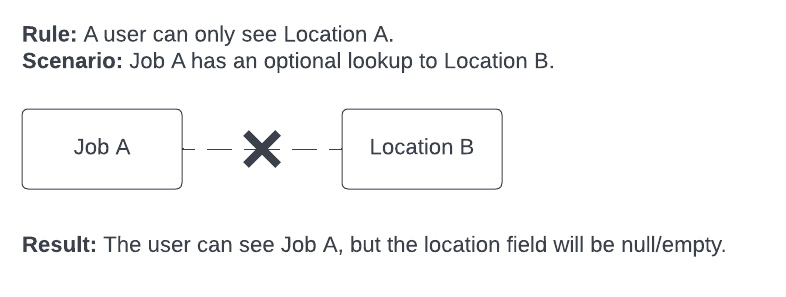
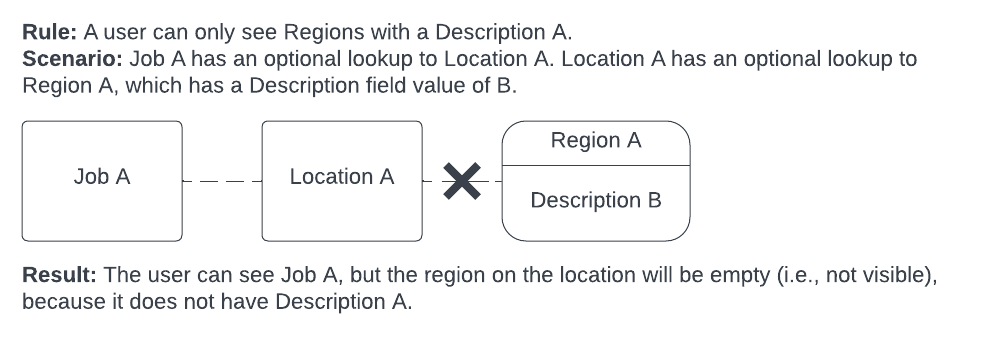
Optional lookups are handled in this way through all levels of data queries, such that records that are restricted by a rule remain inaccessible even when they are optional lookups for records that are optional lookups on records that are accessible.
Example:
Mandatory lookups
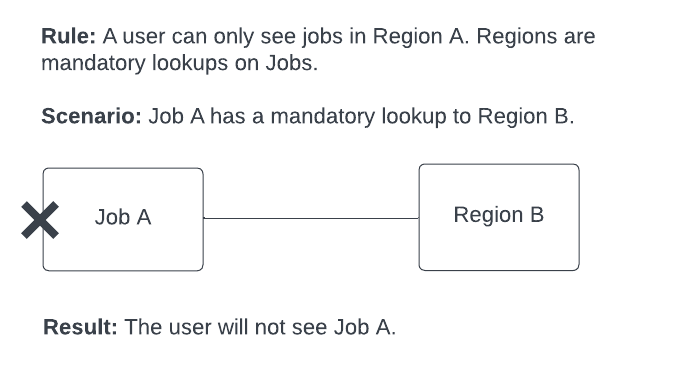
If a record is restricted by a rule and is a mandatory lookup for a record that is not explicitly restricted by a rule, then the record as a whole (including the parent record) will not be visible. This is so that users can’t see a record that has a mandatory relationship to a record that they can’t see.
Example: If you try and return a Jobs object that is not restricted, but there is a mandatory lookup to a Region object that is restricted, then the job is restricted as well.
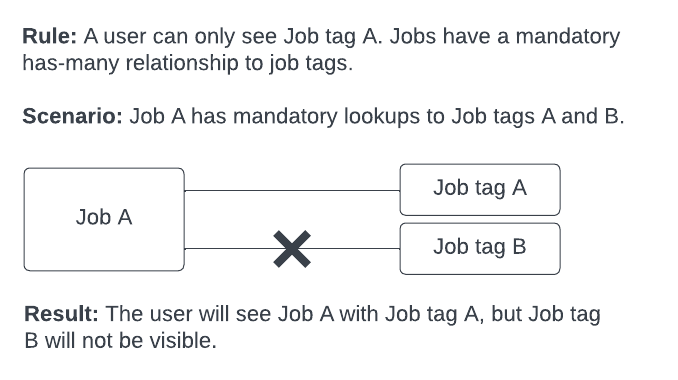
Objects may have a mandatory “has-many” lookup relationship, for example, a job can have many job allocations or many job tags. In this case, only the records that the user is permitted to see will be returned.
Example: If you try and return a Jobs object that is not restricted, but there is a mandatory has-many lookup to a Job tag object that is restricted, then the job will be visible, but only permitted job tags will be visible.
Mutations of records with record access policies
The following principles govern how data can be changed when there are record access policies enabled:
-
You must be able to see the object you’re mutating (a query for the same object should be successful).
-
You must still be able to see the object after you’ve mutated it.
-
If you are performing a bulk mutation and any of the mutations fail points 1 or 2 above, then the whole bulk mutation will return an error.
Summary of the expected behavior for mutations with record access policies
For all items in the table that follow, being able to “see” an object implies that a query for the same record would be successful.
| Mutation | Behavior |
|---|---|
| Get | You can only get objects that you can see. |
| Insert | You can only insert objects that you will be able to see after it is created. |
| Update | You can only perform updates on objects you can see and that you will still be able to see following the update. |
| Upsert | You can only perform upserts on objects that you can see (if already existing) and that you are able to see after the upsert (new and existing objects). |
| Delete | You can only delete objects you can see. |
Note that if you insert or update the value of a lookup reference, you need to be able to see the referenced record. For example, if you are updating a Job to change the Account it is linked to, you need to be able to see the Account record. This behavior applies to Insert, Update, and Upsert.
Insert failures when the rule filters through a related object
Inserts can fail when a record access rule filters an object by joining to a related object rather than using a direct field on the object. The user is otherwise permitted to create the record, but the create is rejected with a policy violation.
This is caused by the second mutation principle on this page: you must still be able to see the object after you have mutated it. After an insert, the platform re-runs the rule’s filter against the new record. When the filter depends on records in a related object (for example, “show this pattern only if it has resources in the user’s region”), no related records exist yet, the filter returns no match, and the insert is rejected with a policy violation error.
Example: Consider an AvailabilityPatterns rule that restricts access based on the regions of associated resources:
UID IN (
  SELECT AvailabilityPatternId FROM AvailabilityPatternResources
  WHERE ResourceId IN (
    SELECT UID FROM Resources
    WHERE PrimaryRegionId IN (
      SELECT RegionId FROM UserRegions WHERE UserId == '{{userId}}'
    )
  )
)
AvailabilityPatterns has no direct RegionId field. Region access is determined entirely through the resources associated via AvailabilityPatternResources. A newly created AvailabilityPattern has no rows in AvailabilityPatternResources yet, so the subquery returns empty, the filter fails the post-insert visibility check, and the insert is rejected.
Recommended: insert the parent and related record in the same mutation
Insert the parent record and the required related record in a single GraphQL mutation using an idAlias. The platform evaluates the rule only after all inserts in the mutation are complete, so the related record exists by the time the visibility check runs. No rule change is needed.
mutation {
  schema {
    insertAvailabilityPatterns(input: { ... }, idAlias: "NEW_PATTERN_ID")
    insertAvailabilityPatternResources(input: {
      AvailabilityPatternId: "NEW_PATTERN_ID"
      ResourceId: "{{resourceId}}"
    })
  }
}
See Perform multiple related mutations using GraphQL aliases for full details on the idAlias pattern.
Workaround A: append an OR condition to the existing rule
If you cannot control the insert flow (for example, a legacy integration that inserts the parent without the related record), add an OR condition scoped to the creating user:
-- append to the existing rule
OR CreatedById == '{{userId}}'
The OR CreatedById == '{{userId}}' condition allows the creating user to see the record immediately after insert. Once resources are linked via AvailabilityPatternResources, the primary filter takes over and controls visibility based on each user’s region.
Workaround B: add a separate Allow rule
Add a separate allow rule scoped to CreatedById == '{{userId}}'. This has the same net effect as Workaround A but keeps the primary deny rule intact and makes the override easier to find and remove later.
Note
Both workarounds carry a permanence trade-off:CreatedById has no region context and is permanent. A user will always be able to see records they created, even if their region assignment changes later. In most use cases this is acceptable, but consider whether this behavior is appropriate for your specific requirements.
Mutations of data with lookup relationships
- Optional lookup relationships (for example,
accountIdon a job) behave slightly differently to how they work for queries as only the ID field is exposed on mutations. They are, however, still used to enforce that the object you are mutating (and any lookup field IDs you supply) are visible to you:- If you supply an ID that you cannot see (that is, a query for the lookup object with that ID would not be found), then the mutation will fail with an error.
- If you request an ID that you cannot see, then it will be returned as null (as if it wasn’t set).
- Mandatory lookup fields (for example,
regionIdon a job):- If you supply an ID that you cannot see, then the mutation will fail with an error.
- If you request a record that you cannot see, then the mutation will fail with an error.
- Mandatory has-many fields:
- If you attempt a mutation on an object with a has-many relationship to an object you cannot see, for example, creating a
JobAllocationfor aJobsobject you cannot see, then the mutation will fail with an error.
- If you attempt a mutation on an object with a has-many relationship to an object you cannot see, for example, creating a
GraphQL subscriptions
Record access policies that apply to a user will also apply to any data that is pushed to the user via a GraphQL subscription.
After a GraphQL subscription is established, it continues to use the same record access filters for the life of the subscription. This means that if the rules change, the subscription will not pick up those changes (unlike queries and mutations, which fetch the current rules for every request). Any changes in RAP rules will only be picked up when the subscription is re-established, for example, when the web app page is refreshed or its token expires.
Feedback
Was this page helpful?